> ## Documentation Index
> Fetch the complete documentation index at: https://docs.confine.app/llms.txt
> Use this file to discover all available pages before exploring further.
# Logging
> Keep a record of what happens in your server.
## Overview
Confine can write a log entry every time something changes in your server — a message gets deleted, someone joins, a role is edited. You choose which categories to track and where each one posts.
All commands here require **Manage Server**.
## Adding a log
```javascript Syntax theme={null}
,log add (channel) (event)
```
```javascript Example theme={null}
,log add #logs messages
```
Different categories can go to different channels, so you can keep message logs separate from moderation-adjacent ones.
### Event categories
| Event | Covers |
| ---------- | ------------------------------------------------------ |
| `messages` | Edits and deletions |
| `members` | Joins, leaves, nickname changes |
| `roles` | Role creation, deletion, and edits |
| `channels` | Channel creation, deletion, and edits |
| `invites` | Invites created and deleted |
| `emojis` | Emoji and sticker changes |
| `voice` | Members joining, leaving, and switching voice channels |
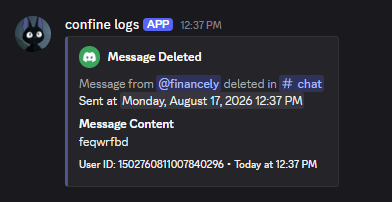 Confine creates a webhook in the channel to post logs through. Deleting that webhook breaks logging for the channel — re-run `,log add` to rebuild it.
Confine needs **View Channel**, **Send Messages**, **Embed Links**, and **Manage Webhooks** in the target channel.
Confine creates a webhook in the channel to post logs through. Deleting that webhook breaks logging for the channel — re-run `,log add` to rebuild it.
Confine needs **View Channel**, **Send Messages**, **Embed Links**, and **Manage Webhooks** in the target channel.
## Removing a log
```javascript Syntax theme={null}
,log remove (channel) (event)
```
```javascript Example theme={null}
,log remove #logs messages
```
Leave the event off and every log in that channel is removed at once: `,log remove #logs`
### Clearing everything
`,log reset` removes every configured log in the server. Confine asks you to confirm with buttons first — only whoever ran the command can answer, and the prompt expires after 30 seconds.
## Ignoring members and channels
Anything ignored is left out of your logs entirely.
```javascript Syntax theme={null}
,log ignore (member or channel)
```
```javascript Example theme={null}
,log ignore @financely
,log ignore #staff-chat
```
`,log ignore list` shows everything currently ignored. `,log ignore reset` clears the list behind a confirmation prompt.
## Custom colors
Each event type in each channel can have its own embed color.
```javascript Syntax theme={null}
,log color (channel) (event) (color)
```
```javascript Example theme={null}
,log color #logs messages #5865F2
```
Hex codes work with or without the `#`. You can also use a name: `red`, `green`, `blue`, `yellow`, `orange`, `purple`, `pink`, `black`, `white`, or `gray`.
`,log color list (channel)` shows the colors set for every event in that channel.
## Reviewing your setup
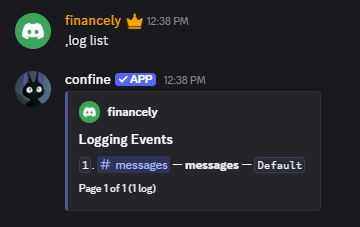
`,log list` pages through every configured log with its channel, event type, and color.
 ## Aliases
`,logs` and `,logging` both work in place of `,log`.
## Aliases
`,logs` and `,logging` both work in place of `,log`.