> ## Documentation Index
> Fetch the complete documentation index at: https://docs.confine.app/llms.txt
> Use this file to discover all available pages before exploring further.
# VoiceMaster
> Create temporary voice channels instantly in your server.
## Getting started
To turn on VoiceMaster, run `,voicemaster setup` once — this builds everything confine needs automatically.
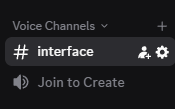 Feel free to rename or relocate the channels it creates afterward — nothing will break.
### The `#interface` channel
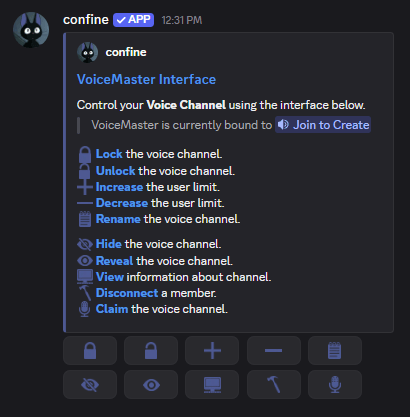
This channel holds a single embed with buttons members use to manage their own temporary channel — renaming it, locking it, setting limits, and more.
Feel free to rename or relocate the channels it creates afterward — nothing will break.
### The `#interface` channel
This channel holds a single embed with buttons members use to manage their own temporary channel — renaming it, locking it, setting limits, and more.
 ### The Join to Create channel
This is the channel members sit in to trigger a brand new voice channel just for them. Without it, VoiceMaster has nothing to hook into — it's a required piece, not optional.
## Setting defaults for new channels
Every temporary channel VoiceMaster creates can follow a template you define. These all live under `,voicemaster default`.
Send new temporary channels into a specific category instead of wherever they'd land by default.
```javascript Syntax theme={null}
,voicemaster category (category)
```
```javascript Example theme={null}
,voicemaster category Voice Channels
```
Works with `{user.name}` and `{user.display_name}` variables.
```javascript Syntax theme={null}
,voicemaster default name (name)
```
```javascript Example theme={null}
,voicemaster default name {user.display_name}'s vc
```
Must fall somewhere between `8` and `384`.
```javascript Syntax theme={null}
,voicemaster default bitrate (kbps)
```
```javascript Example theme={null}
,voicemaster default bitrate 384
```
Pick one of:
### The Join to Create channel
This is the channel members sit in to trigger a brand new voice channel just for them. Without it, VoiceMaster has nothing to hook into — it's a required piece, not optional.
## Setting defaults for new channels
Every temporary channel VoiceMaster creates can follow a template you define. These all live under `,voicemaster default`.
Send new temporary channels into a specific category instead of wherever they'd land by default.
```javascript Syntax theme={null}
,voicemaster category (category)
```
```javascript Example theme={null}
,voicemaster category Voice Channels
```
Works with `{user.name}` and `{user.display_name}` variables.
```javascript Syntax theme={null}
,voicemaster default name (name)
```
```javascript Example theme={null}
,voicemaster default name {user.display_name}'s vc
```
Must fall somewhere between `8` and `384`.
```javascript Syntax theme={null}
,voicemaster default bitrate (kbps)
```
```javascript Example theme={null}
,voicemaster default bitrate 384
```
Pick one of:
`brazil`, `hongkong`, `india`, `japan`, `rotterdam`, `russia`, `singapore`, `south-korea`, `southafrica`, `sydney`, `us-central`, `us-east`, `us-south`, `us-west`
```javascript Syntax theme={null}
,voicemaster default region (region)
```
```javascript Example theme={null}
,voicemaster default region russia
```
### Locking down the interface channel
To make `#interface` only visible while someone's in a temp channel, deny **View Channel** for `@everyone`, then allow it for the role you just set up above.
## Commands members use inside their channel
These all run directly in `#interface` once someone owns a temporary channel.
### Renaming
Limited to once every **10 minutes**.
```javascript Syntax theme={null}
,voicemaster rename (name)
```
```javascript Example theme={null}
,voicemaster rename ethan's vc
```
### Capping member count
```javascript Syntax theme={null}
,voicemaster limit (number)
```
```javascript Example theme={null}
,voicemaster limit 5
```
### Locking and hiding the channel
* `,voicemaster lock` — blocks new members from joining
* `,voicemaster unlock` — opens it back up
* `,voicemaster ghost` — removes the channel from the visible list
* `,voicemaster unghost` — makes it visible again
#### Letting specific people in
```javascript Syntax theme={null}
,voicemaster permit (member or role)
```
```javascript Example theme={null}
,voicemaster permit @financely
```
### Giving members in your channel a role
Requires `ManageRoles` permission to run.
```javascript Syntax theme={null}
,voicemaster role (role)
```
```javascript Example theme={null}
,voicemaster role @Listening Party
```
## Ownership & extras
Run `,voicemaster music` to mute everyone's mic in the channel — useful for listening parties where talking isn't the point.
```javascript Syntax theme={null}
,voicemaster transfer (member)
```
```javascript Example theme={null}
,voicemaster transfer @financely
```
If the current owner leaves without transferring it, run `,voicemaster claim` to take it over yourself.