> ## Documentation Index
> Fetch the complete documentation index at: https://docs.confine.app/llms.txt
> Use this file to discover all available pages before exploring further.
# Starboard
> Repost your server's best messages to a dedicated channel.
## How it works
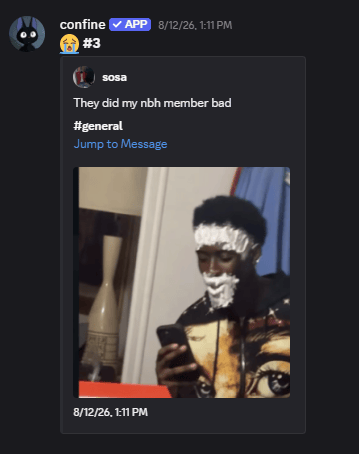
Members react to a message with your chosen emoji. Once enough of them do, confine reposts it to your starboard channel — a running highlight reel your server curates itself.
 Every command here requires **Manage Server**.
## Setup
```javascript Syntax theme={null}
,starboard set (channel)
```
```javascript Example theme={null}
,starboard set #starboard
```
Confine needs **View Channel**, **Send Messages**, and **Embed Links** there.
```javascript theme={null}
,starboard unlock
```
Nothing gets reposted until you run this.
You can't enable starboard before setting a channel — confine will tell you to do that first.
Pause it any time with `,starboard lock`. Your settings stay intact.
## Tuning it
### Reaction threshold
How many reactions a message needs before it gets reposted.
```javascript Syntax theme={null}
,starboard threshold (number)
```
```javascript Example theme={null}
,starboard threshold 5
```
Minimum is **3** — low enough that a couple of friends can't spam the board.
### The emoji
```javascript Syntax theme={null}
,starboard emoji (emoji)
```
```javascript Example theme={null}
,starboard emoji 🤩
```
Defaults to ⭐. Custom server emojis work as long as confine has access to them.
### Self-starring
Whether members can star their own messages.
```javascript Syntax theme={null}
,starboard selfstar (yes or no)
```
```javascript Example theme={null}
,starboard selfstar no
```
## Customizing the post
```javascript Syntax theme={null}
,starboard color (color)
```
```javascript Example theme={null}
,starboard color #5865F2
,starboard color pink
```
Toggles whether the post includes a link back to the original message.
```javascript theme={null}
,starboard jumpurl no
```
Toggles the timestamp on the embed.
```javascript theme={null}
,starboard timestamp no
```
Toggles whether images and files from the original message carry over.
```javascript theme={null}
,starboard attachments no
```
## Ignoring channels, roles, and members
Anything ignored never reaches the starboard, no matter how many reactions it gets.
```javascript Syntax theme={null}
,starboard ignore add (channel, role, or member)
```
```javascript Example theme={null}
,starboard ignore add #spam
,starboard ignore add @Muted
,starboard ignore add @financely
```
| Command | What it does |
| ----------------------------------- | ------------------------------------------- |
| `,starboard ignore remove (target)` | Take something off the list |
| `,starboard ignore list` | See everything ignored |
| `,starboard ignore reset` | Clear the list behind a confirmation prompt |
## Checking your setup
`,starboard config` shows everything at once — channel, emoji, threshold, color, and all your toggles.
## Starting over
`,starboard reset` wipes your configuration back to defaults.
Every command here requires **Manage Server**.
## Setup
```javascript Syntax theme={null}
,starboard set (channel)
```
```javascript Example theme={null}
,starboard set #starboard
```
Confine needs **View Channel**, **Send Messages**, and **Embed Links** there.
```javascript theme={null}
,starboard unlock
```
Nothing gets reposted until you run this.
You can't enable starboard before setting a channel — confine will tell you to do that first.
Pause it any time with `,starboard lock`. Your settings stay intact.
## Tuning it
### Reaction threshold
How many reactions a message needs before it gets reposted.
```javascript Syntax theme={null}
,starboard threshold (number)
```
```javascript Example theme={null}
,starboard threshold 5
```
Minimum is **3** — low enough that a couple of friends can't spam the board.
### The emoji
```javascript Syntax theme={null}
,starboard emoji (emoji)
```
```javascript Example theme={null}
,starboard emoji 🤩
```
Defaults to ⭐. Custom server emojis work as long as confine has access to them.
### Self-starring
Whether members can star their own messages.
```javascript Syntax theme={null}
,starboard selfstar (yes or no)
```
```javascript Example theme={null}
,starboard selfstar no
```
## Customizing the post
```javascript Syntax theme={null}
,starboard color (color)
```
```javascript Example theme={null}
,starboard color #5865F2
,starboard color pink
```
Toggles whether the post includes a link back to the original message.
```javascript theme={null}
,starboard jumpurl no
```
Toggles the timestamp on the embed.
```javascript theme={null}
,starboard timestamp no
```
Toggles whether images and files from the original message carry over.
```javascript theme={null}
,starboard attachments no
```
## Ignoring channels, roles, and members
Anything ignored never reaches the starboard, no matter how many reactions it gets.
```javascript Syntax theme={null}
,starboard ignore add (channel, role, or member)
```
```javascript Example theme={null}
,starboard ignore add #spam
,starboard ignore add @Muted
,starboard ignore add @financely
```
| Command | What it does |
| ----------------------------------- | ------------------------------------------- |
| `,starboard ignore remove (target)` | Take something off the list |
| `,starboard ignore list` | See everything ignored |
| `,starboard ignore reset` | Clear the list behind a confirmation prompt |
## Checking your setup
`,starboard config` shows everything at once — channel, emoji, threshold, color, and all your toggles.
## Starting over
`,starboard reset` wipes your configuration back to defaults.