> ## Documentation Index
> Fetch the complete documentation index at: https://docs.confine.app/llms.txt
> Use this file to discover all available pages before exploring further.
# Fake Permissions
> Give your staff moderation power through confine without handing them real Discord permissions.
## What this solves
A moderator with a genuine `Ban Members` permission can do damage confine never sees — a script hitting the Discord API directly, a compromised account mass-banning through the client, or someone acting outside your logs entirely.
Fake permissions close that gap. Your staff keep working normally, but every action they take flows through confine, where it can be tracked, rate-limited, and reversed.
## How it works
You assign a permission like `ban_members` to a role through confine. Members with that role can now run `,ban` — but their actual Discord permissions stay untouched, so the native right-click ban option and any API access remain off-limits to them.
The result: full moderation capability, zero raw Discord power.
Every command on this page is restricted to the **server owner**. Not administrators, not co-owners — the owner account only.
## Assigning permissions
```javascript Syntax theme={null}
,fakepermissions add (role) (permission)
```
```javascript Example theme={null}
,fakepermissions add @Mod ban_members, kick_members
```
Stack several at once by separating them with commas or spaces. `,fp add @Mod ban_members kick_members` works exactly the same as the comma version.
Confine rejects a permission a role already holds, so re-running a command won't create duplicates.
## Removing permissions
```javascript Syntax theme={null}
,fakepermissions remove (role) (permission)
```
```javascript Example theme={null}
,fakepermissions remove @Mod ban_members
```
Trying to strip something the role was never given returns a warning instead of failing silently.
## Reviewing your setup
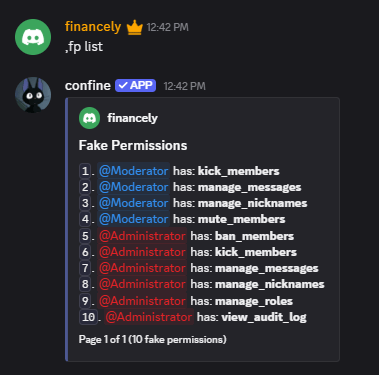
Run `,fakepermissions list` to page through every role and the permissions attached to it.
 ## Wiping everything
`,fakepermissions reset` clears all fake permissions server-wide. Confine will ask you to confirm with a button first — the prompt expires after 30 seconds and only responds to the person who ran it.
## Available permissions
| Permission | Grants |
| ------------------ | --------------------------------- |
| `ban_members` | Banning and unbanning members |
| `kick_members` | Removing members from the server |
| `manage_messages` | Deleting and purging messages |
| `manage_nicknames` | Changing other members' nicknames |
| `change_nickname` | Changing their own nickname |
| `view_audit_log` | Reading the server audit log |
| Permission | Grants |
| ---------------- | --------------------------------------- |
| `mute_members` | Server-muting members in voice |
| `deafen_members` | Server-deafening members in voice |
| `move_members` | Dragging members between voice channels |
| Permission | Grants |
| -------------------- | ----------------------------------------- |
| `administrator` | Every moderation command confine offers |
| `manage_guild` | Editing server-level settings |
| `manage_channels` | Creating, editing, and deleting channels |
| `manage_roles` | Creating and assigning roles |
| `manage_webhooks` | Managing server webhooks |
| `manage_expressions` | Managing emojis, stickers, and soundboard |
## Suggested setups
Enough to handle chat without touching membership.
```javascript theme={null}
,fp add @Trial Mod manage_messages, change_nickname
```
Standard staff coverage — chat control plus the ability to remove problem members.
```javascript theme={null}
,fp add @Moderator manage_messages, manage_nicknames, kick_members, mute_members
```
Adds bans, roles, and audit visibility on top of the moderator set.
```javascript theme={null}
,fp add @Admin manage_messages, manage_nicknames, kick_members, ban_members, manage_roles, view_audit_log
```
One permission covering everything.
```javascript theme={null}
,fp add @Co-Owner administrator
```
## Wiping everything
`,fakepermissions reset` clears all fake permissions server-wide. Confine will ask you to confirm with a button first — the prompt expires after 30 seconds and only responds to the person who ran it.
## Available permissions
| Permission | Grants |
| ------------------ | --------------------------------- |
| `ban_members` | Banning and unbanning members |
| `kick_members` | Removing members from the server |
| `manage_messages` | Deleting and purging messages |
| `manage_nicknames` | Changing other members' nicknames |
| `change_nickname` | Changing their own nickname |
| `view_audit_log` | Reading the server audit log |
| Permission | Grants |
| ---------------- | --------------------------------------- |
| `mute_members` | Server-muting members in voice |
| `deafen_members` | Server-deafening members in voice |
| `move_members` | Dragging members between voice channels |
| Permission | Grants |
| -------------------- | ----------------------------------------- |
| `administrator` | Every moderation command confine offers |
| `manage_guild` | Editing server-level settings |
| `manage_channels` | Creating, editing, and deleting channels |
| `manage_roles` | Creating and assigning roles |
| `manage_webhooks` | Managing server webhooks |
| `manage_expressions` | Managing emojis, stickers, and soundboard |
## Suggested setups
Enough to handle chat without touching membership.
```javascript theme={null}
,fp add @Trial Mod manage_messages, change_nickname
```
Standard staff coverage — chat control plus the ability to remove problem members.
```javascript theme={null}
,fp add @Moderator manage_messages, manage_nicknames, kick_members, mute_members
```
Adds bans, roles, and audit visibility on top of the moderator set.
```javascript theme={null}
,fp add @Admin manage_messages, manage_nicknames, kick_members, ban_members, manage_roles, view_audit_log
```
One permission covering everything.
```javascript theme={null}
,fp add @Co-Owner administrator
```