
Getting started
XP tracking is off until you turn it on. Nothing else on this page has any effect until you do.,level lock to pause tracking without losing anyone’s progress.
Ignoring channels and roles
Do this before members start earning. Any channel or role on the ignore list earns nothing.Reward roles
Assign a role to a level and members receive it when they get there.Levels run from 1 to 100.
,level update behaves identically to add — use whichever reads better.Stacking
With stacking on, members keep every role they’ve earned along the way. With it off, they only hold the role for their current tier.Backfilling existing members
If your server already had XP before you set up rewards,,level sync walks every member and applies the roles their current level entitles them to.
Level-up messages
{embed} for a rich embed. See Embed Scripting.
,level message view shows what’s currently set.
Where it posts
XP rate
Must be between 0.1 and 10.
Viewing progress
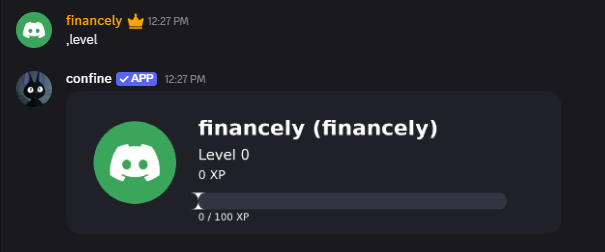
Running,level on its own generates a rank card showing your avatar, level, total XP, and a progress bar toward the next level. Add a member to see theirs:
,level leaderboard ranks the top 50 earners. you can also rename the leaderboard heading:
Admin tools
Checking your configuration
Checking your configuration
,level config shows whether tracking is on, your XP rate, message mode and channel, stacking setting, and how many rewards and ignores are configured.Listing everyone with XP
Listing everyone with XP
,level list pages through every member who has earned XP, with their level and total.Wiping all XP
Wiping all XP
,level reset clears every member’s XP and levels. Confirmation prompt first — buttons only respond to whoever ran it, and expire after 30 seconds.Removing data for members who left
Removing data for members who left
,level cleanup drops level data for anyone no longer in the server, leaving current members untouched.