
What this solves
A moderator with a genuineBan Members permission can do damage confine never sees — a script hitting the Discord API directly, a compromised account mass-banning through the client, or someone acting outside your logs entirely.
Fake permissions close that gap. Your staff keep working normally, but every action they take flows through confine, where it can be tracked, rate-limited, and reversed.
How it works
You assign a permission likeban_members to a role through confine. Members with that role can now run ,ban — but their actual Discord permissions stay untouched, so the native right-click ban option and any API access remain off-limits to them.
The result: full moderation capability, zero raw Discord power.
Assigning permissions
Stack several at once by separating them with commas or spaces.
,fp add @Mod ban_members kick_members works exactly the same as the comma version.Removing permissions
Reviewing your setup
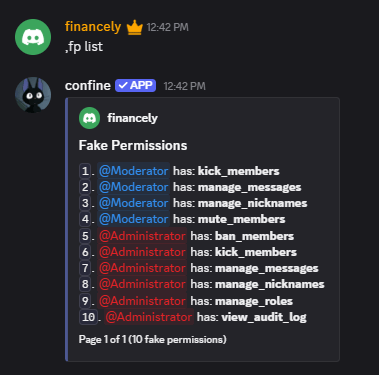
Run,fakepermissions list to page through every role and the permissions attached to it.
Wiping everything
,fakepermissions reset clears all fake permissions server-wide. Confine will ask you to confirm with a button first — the prompt expires after 30 seconds and only responds to the person who ran it.
Available permissions
- Moderation
- Voice
- Server
Suggested setups
- Trial Mod
- Moderator
- Administrator
- Co-Owner
Enough to handle chat without touching membership.